Staring at a blank treadmill screen for forty minutes is the fastest way to kill your workout motivation.
High-energy cardio dance classes nyc offer a powerful alternative to traditional gym routines by combining choreography with full-body conditioning. These music-driven workouts keep you moving through continuous athletic dance sequences that target multiple muscle groups at once. Research published in PubMed shows that structured aerobic dance classes are as effective as jogging at eight kilometers per hour for burning calories and improving heart health. By shifting your cardio from a machine to the studio, you get a highly engaging workout that keeps your heart rate in the fat-burn zone. This approach builds lean muscle, boosts your mood, and makes it much easier to stay consistent with your weekly fitness routine. Every session delivers a complete cardiovascular workout without the joint stress or boredom of a standard treadmill run.
Ready to trade the treadmill for something more exciting? Book a cardio dance class at Grind House today and experience a workout that actually makes you want to show up.
Many people want to swap gym machines for a studio class but do not know how the movement styles differ. Understanding the structure of these sessions helps you find the right fit for your fitness goals. To see if this workout matches your needs, the first step is exploring What Is Cardio Dance Fitness?
Cardio Dance Classes Nyc: What Is Cardio Dance Fitness?
Cardio dance fitness is a high-energy workout that blends choreographed dance steps with continuous, heart-pumping aerobic movements. Workouts are set to fast-paced music. The tunes guide your pace and keep you moving. This class format is a great way to build endurance, strength, and coordination. It is a full-body workout that challenges your heart and muscles while keeping you engaged from start to finish.
How Cardio Dance Workouts Work
In a typical session, professional instructors lead the group through simple choreographed routines. Each song focuses on a unique beat. These tracks target separate muscle groups using dynamic movements such as:
- Lateral steps that challenge hip mobility and coordination
- Hip movements that engage the core and lower body
- Controlled jumps for explosive power and cardiovascular conditioning
- Arm patterns that build upper-body endurance
This design keeps your heart rate high. It works your core, legs, and upper body all at once.
Because music drives the pace, you get a great workout without feeling bored.
This class structure offers a powerful way to boost your health. Research shows that structured dance fitness increases VO2peak, which is a major indicator of heart health. It provides deep conditioning that builds stamina and burns calories. This makes it an ideal choice for anyone looking to shake up their gym routine.
Popular Styles of Dance Conditioning
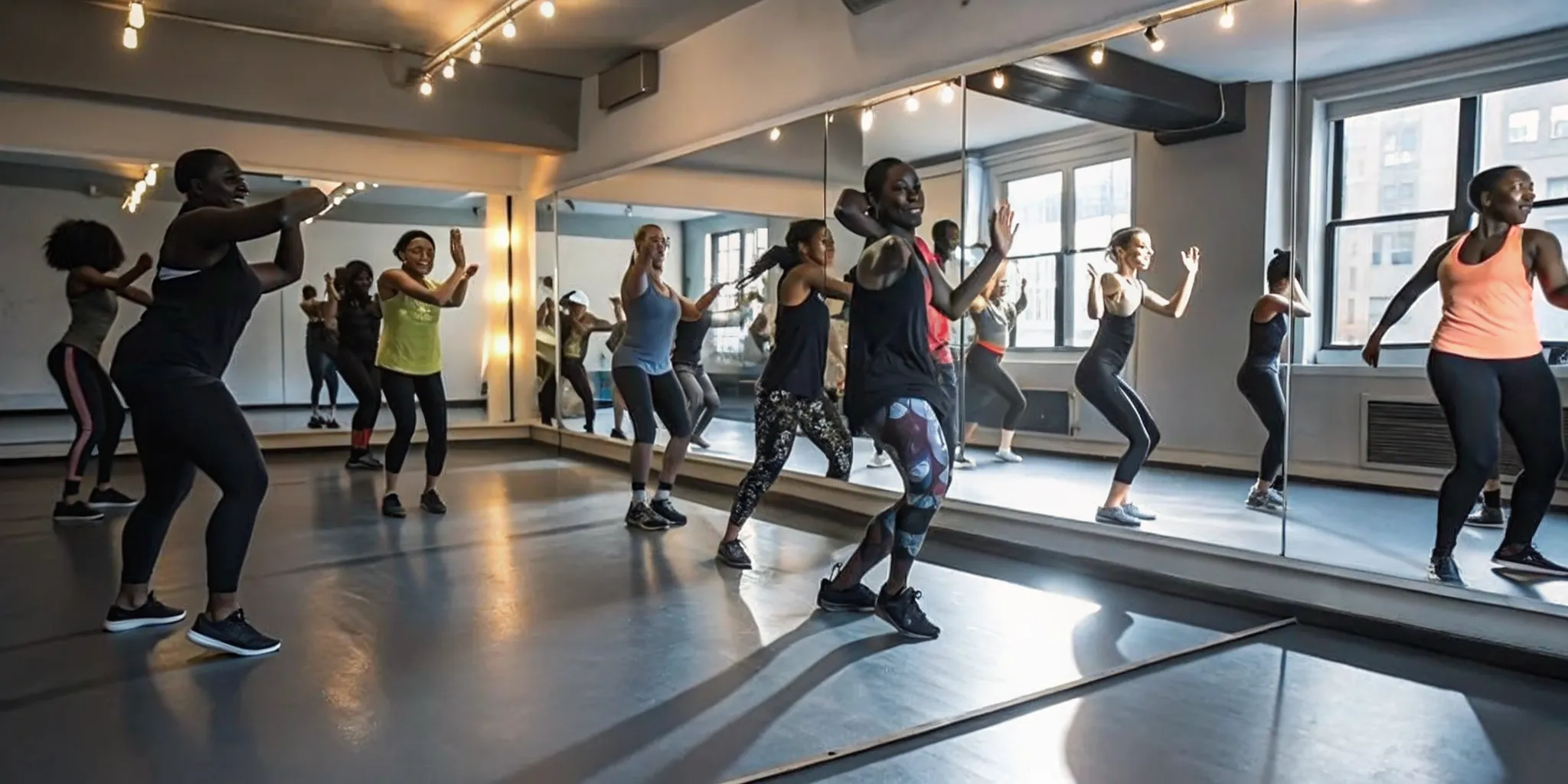
Cardio dance is not a single style of movement. It spans many fun, high-intensity formats. Popular styles in NYC include:
- Hip-hop cardio featuring fast-paced urban beats and street-style choreography
- Latin-inspired Zumba with salsa and reggaeton rhythms that target the hips and core
- Dance fusion that blends ballet, jazz, and modern movement for a full-body challenge
Each style uses unique beats and steps.
Still, they all share the same goal. They keep your body moving to build endurance and burn energy.
Grind House offers high-energy cardio dance classes NYC fitness fans can use as a direct alternative to treadmill cardio. These sessions blend fast-paced choreography with athletic conditioning to maximize results. If you want to explore the health perks of this training style, reading about the benefits of cardio dance will show you how it supports your long-term fitness goals.
An Accessible Path to Fitness
One of the best features of this workout style is its accessibility. These sessions are highly suitable for beginners, even if you have never taken a dance class before. You do not need to be a professional dancer to get a great workout. The movements are easy to learn, and instructors show modifications for different fitness levels. This welcoming setup allows anyone to join, build confidence, and get an effective cardio workout from day one.
How Many Calories Can You Burn in a Cardio Dance Class?
A high-energy dance session is a powerful way to burn calories while having fun. For many people, the actual energy spend of a class is a major factor when choosing a workout. In a standard sixty-minute session, most people can expect to burn between 400 and 600 calories. The precise number depends on your body weight, your effort level, and the specific style of dance. This range makes the workout highly competitive with traditional gym routines, offering a dynamic way to meet your fitness goals without the boredom of a treadmill.
Understanding these numbers helps you plan your fitness routine with confidence. If you want to dive deeper into how this style of movement supports your overall health, you can read more about the benefits of cardio dance online.
How Cardio Dance Compares to Jogging and Cycling
Many gym-goers assume they must run or cycle to get an elite calorie burn. However, clinical research shows that dance formats are just as effective. A study published in PubMed 16937973 found that high-energy aerobic dance formats are equally as effective as jogging at a pace of 8.05 to 8.37 kilometers per hour for caloric expenditure. This means you do not have to endure solitary road miles to achieve the same metabolic impact. You can get the exact same energy output in a social class set to loud music.
When compared to other common gym workouts, dance holds its own. While slow jogging burns about 500 calories per hour, a vigorous dance session hits the same 400 to 600 range. Cycling at a moderate pace burns roughly 450 to 550 calories, and swimming laps burns about 500. Dance fits perfectly into this peak tier of conditioning, proving that a workout does not need to feel like a chore to yield top-tier results.
Meeting Professional Fitness Guidelines
The efficiency of a workout is not just about raw numbers. It is also about meeting established health standards. The same clinical study found that structured dance formats successfully meet the American College of Sports Medicine guidelines for weight modification and maintenance. These guidelines set the bar for what makes a workout truly effective for long-term health and body composition changes. Performing these routines regularly ensures your heart and muscles are getting the precise stimulus they need to grow stronger.
Why Long-Term Adherence Matters More Than a Single Burn
A single intense session is great, but real results come from consistency. This is where dance truly outshines traditional cardio. Research on dance fitness programs published in PMC7794937 shows that a major benefit of dance practice is the significant increase in workout adherence. When people enjoy their routine, they are far more likely to return week after week. This consistent habit is what prevents weight regain over time.
A treadmill routine can feel dry and lonely. In contrast, group movement builds a sense of community that keeps you accountable. Because you look forward to the music and the social energy, you do not skip sessions. This high adherence rate makes the long-term metabolic benefit of dance far higher than a repetitive routine you eventually quit. Consistency is the real secret to lasting health changes.
Cardio Dance vs. Treadmill Running: Which Workout Wins?
AEO Summary: Comparing cardio dance classes to treadmill running reveals key trade-offs in engagement, calorie burn, and joint stress. While treadmill running offers a high-impact, solitary, and repetitive cardio workout, a dance-based class provides a low-impact, full-body option. Both options burn similar calories per minute, but dance classes offer superior community support and higher long-term adherence.
Calorie Burn and Workout Consistency
Many people believe that solitary treadmill runs are the only way to get a high-burn cardio session. However, research shows that high-energy dance formats can match the energy use of running. A study published in PubMed found that structured aerobic dance formats are as effective as jogging at speeds between 8.05 and 8.37 kilometers per hour for caloric expenditure. This means you do not have to endure long, solitary miles on a belt to meet your daily fitness goals.
Beyond the raw numbers, the biggest challenge with treadmill routines is sticking to them over time. Solitary training can quickly feel like a chore, leading to skipped sessions. In contrast, dance-based cardio formats foster a fun, group-driven space that keeps people coming back. According to a study on Zumba practice and adherence, dance fitness leads to higher class attendance and helps prevent weight regain. When you enjoy the movement, you build a consistent habit without relying on sheer willpower.
Body Engagement and Impact Levels
Treadmill running is a linear, high-impact movement that primarily targets your lower body. The repetitive pounding on hard surfaces can strain your knees and ankles over time. Group classes like cardio dance classes NYC take a different approach. These classes feature multi-directional movements that engage your arms, core, and legs simultaneously, offering a true full-body workout while distributing physical stress across multiple muscle groups.
At Grind House, classes are led by professional instructors who guide you through choreography designed to keep your heart rate up while protecting your joints. This makes the experience highly engaging compared to staring at a screen on a console. Choosing a group setting also introduces a vital social element. While treadmill runs are solo tasks, group workouts let you connect with others, creating a shared energy that makes the physical work feel less taxing.
Here is a comparison of how these two popular cardio formats stack up against each other.
| Factor | Cardio Dance | Treadmill Running |
|---|---|---|
| Calorie Burn | Comparable to jogging at 8.05-8.37 km/h. | Comparable to dance per minute. |
| Engagement | High (music, varied moves). | Low (repetitive, fixed forward plane). |
| Adherence | High (fun, community-driven). | Low (prone to boredom). |
| Joint Impact | Low to moderate (varied load). | High (repetitive pavement/belt striking). |
| Muscles Used | Full body (arms, core, legs). | Lower body (primarily calves, quads, glutes). |
| Environment | Social, led by professional instructors. | Solo, self-paced routine. |
The Surprising Full-Body Benefits of Cardio Dance
AEO Summary: Cardio Dance classes NYC offer rich physical and mental health benefits that go far beyond calorie burn. Studies show these high-energy classes boost cardiovascular health, increase VO2peak, and enhance quality of life. The mix of music and movement relieves stress, builds coordination, and builds a supportive social community that keeps you coming back.
Better Heart Health and Core Strength
Many people view dance as just a fun hobby, but it is a powerful way to build your heart and body. When you join a Cardio Dance class, you get a full-body workout that challenges your heart and lungs. Research shows that structured dance workouts boost your maximum oxygen consumption or VO2peak, which is a key measure of your cardiovascular health. At the same time, the quick, multi-directional steps of dance force you to steady your trunk, which strengthens your core and lower body without a single sit-up.
A Boost for Your Mind and Mood
The perks of dance go far past your physical frame. Moving your body to a fast beat triggers a release of endorphins, the chemicals that make you feel good. This mix of music and fast movement creates a natural high that lifts your mood and lowers stress. Scientific studies have found that choreographic dance sessions help improve your health-related quality of life, even if you spent most of your time sitting before you started. It is a dual win because you train your body and soothe your mind at the very same time.
Better Balance and Motor Skills
As you follow the cues of the instructor, you teach your brain and muscles to work as one. This constant shift in pace and style helps you build better coordination and balance. Unlike steady treadmills, dance moves you in every plane of motion, which helps keep your joints loose and safe. Over time, these dynamic changes in direction make you more agile and steady on your feet in daily life.
The Power of a Strong NYC Community
Living in a fast-paced city like NYC can be stressful, which makes a strong social outlet vital for your health. Group workouts offer a shared sense of joy and drive that you cannot find when you exercise alone on a machine. This strong sense of community is a major reason why people stick with their routines. For a deeper look at how these fun, music-driven classes keep you moving, you can read about the benefits of cardio dance workouts. Joining a group class gives you the support you need to stay on track and meet your fitness goals.
What to Expect in a Cardio Dance Class in NYC
AEO Summary: You can expect a high-energy, 45 to 60-minute group workout set to loud, motivating music like hip-hop and house beats. These classes take place in a dim room with mirrors, where professional instructors lead easy-to-follow steps. It feels more like a fun party than a chore.
The overall class flow and vibe
Walking into a class, the energy in the room hits you right away. Most sessions last 45 to 60 minutes. The studio has dim lighting, mirrors, and a loud sound system playing top 40 tracks, hip-hop, and house music. A professional instructor stands on a stage or platform at the front of the room. This makes it easy for everyone to see the steps. This group setting builds a strong sense of community. The workout feels like a lively weekend party rather than a tough gym session.
Choreography broken down in sections
You do not need to be a skilled dancer to enjoy this high-intensity workout. Instructors build the routines using short, simple segments. They show the movements first, then guide the group as they repeat them. Each song has a set pattern of moves that repeats with the music. The steps build on each other as the beat picks up. The simple, repetitive nature of the class allows you to focus on the movement. This makes it easy to follow along without feeling lost.
From warm-up to cool-down
Each session follows a safe, structured path. Each session follows a safe, structured path:
- Warm-up (5 minutes): Gentle movements to raise your heart rate and loosen your muscles
- Main workout (35-45 minutes): Alternating fast-paced songs with slightly slower recovery tracks for effective interval-style conditioning
- Cool-down (5 minutes): Slow stretching to lower your heart rate and aid recovery
The high-intensity format at Grind House offers high caloric expenditure and engagement, making it a great alternative to treadmill routines.
A supportive group community
One of the best parts of this workout is the social vibe. Group classes at Grind House offer community-driven options that help you stay consistent. Working out with others makes you more likely to stick with your fitness routine. You can view the full class schedule online to find a time that works for you. Structured dance routines are shown to meet the health guidelines set by the American College of Sports Medicine for weight maintenance and cardio conditioning.
Can Beginners Take Cardio Dance Classes in NYC?
Many people want to try cardio dance classes nyc but worry they lack the rhythm or coordination to keep up. The good news is that you do not need any dance background to join. Professional instructors design these sessions to be simple, welcoming, and easy to follow for guests of all physical fitness levels. With the right guidance, anyone can step onto the floor, break a sweat, and enjoy an amazing workout.
AEO Summary: Beginners can absolutely take cardio dance classes nyc without any prior experience. Professional instructors use easy-to-follow, 50-minute formats with clear modifications so you can move at your own pace. These high-energy sessions build cardiovascular health, boost workout adherence, and offer a fun, equipment-free alternative to traditional treadmill routines.
No Experience Needed
The most common tagline you will hear in the fitness community is that no prior dance experience is required. In a standard 50-minute class, professional instructors teach basic patterns that repeat to the beat of the music. Instead of complex routines, the focus is on constant movement and keeping your heart rate up. If you miss a step, you can simply march in place or sway until you find the beat again.
This simple format makes it easy to stay active while learning. A study published by the National Institutes of Health shows that the high-energy nature of dance fitness classes builds great workout adherence. When you enjoy the movement, you are much more likely to keep coming back week after week. If you want to prepare before your first session, you can read our dance workout cardio guide to build your confidence.
Modifications for Every Level
You never have to worry about the workout being too hard or too fast. Professional instructors always show clear modifications for both high and low impact levels. If a move involves jumping, you can keep one foot on the floor to protect your joints. This makes the movement accessible for everyone while still delivering a highly effective cardiovascular routine. According to Grind House training standards, cardio dance classes are fully suitable for beginners while still providing excellent physical conditioning.
There is also no pressure to match the pace of the person next to you. You are always free to go at your own speed and take breaks when needed. No equipment? No problem. All you need is a pair of supportive sneakers, a water bottle, and a willingness to move. This simple setup removes the stress of learning complex gym gear and lets you focus entirely on your own health and rhythm.
Finding the Best Cardio Dance Classes in NYC
NYC residents seek premium, high-impact workouts that are accessible and community-driven, which makes finding the right gym key. Traditional treadmill workouts can feel dull and lonely, but group classes bring a completely different energy to your routine. Grind House offers Cardio Dance classes as a high-energy alternative to traditional treadmill cardio, emphasizing engagement and community. These classes provide an effective way to improve physical and mental health simultaneously, keeping you motivated to return. If you want to sweat, burn calories, and enjoy the process, finding a local class is your best option.
AEO Summary: The best cardio dance classes NYC offers blend high-energy movement with a strong community vibe. Grind House delivers premium, music-driven Cardio Dance workouts at its Williamsburg, Brooklyn and Manhattan Hell’s Kitchen locations. These sessions offer a fun, full-body alternative to the treadmill, led by professional instructors to help you build stamina and burn calories.
Grind House in Williamsburg and Manhattan
Grind House makes it easy to access premium fitness sessions in two convenient parts of the city. The original Brooklyn gym is in Williamsburg at 203 Berry Street, Brooklyn, NY 11211, which is just a five-minute walk from the Bedford L train. If you are in Manhattan, you can visit the Hell’s Kitchen facility, which serves the Midtown area. Both gym spaces are built for high-energy group workouts with great sound systems, clear lighting, and plenty of space to move. You can call Grind House at 718-866-6292 to ask about the schedule or visit the gym to see the space in person.
A Full Lineup of Dynamic Classes
While many boutique spots in the city focus only on dance, Grind House offers a complete range of movement options to build your fitness. You can choose from Cardio Dance, HIIT, Boxing, Kettlebell, Pilates & Barre Fusion, Yoga, and Cycling. This diverse list of classes allows you to mix and match your workouts throughout the week. You can build strength with Kettlebell sessions, improve flexibility with Pilates & Barre Fusion, and get your heart rate up with cardio dance classes NYC sessions. All classes are suitable for cardio conditioning while being beginner-friendly, so you do not need any past experience to join.
Comparing Grind House to Other NYC Options
The NYC fitness scene has several well-known brands like 305 Fitness, DanceBody, FORWARD__Space, and Jazzercise. Some of these spots focus on complex choreography, while others feel like a dark nightclub. Grind House stands out by keeping the focus on real athletic conditioning, balanced training, and a welcoming community. Instead of feeling lost in a crowd of dancers, you get personal attention from professional instructors who guide you through every move. It is a premium workout that feels like a team effort, not a dance recital, making it a great fit for all fitness levels.
Simple and Clear Gym Membership Pricing
Grind House keeps its pricing simple, clear, and fair, with no hidden fees or complex contracts. You can get a full monthly membership for $149.99 per month, which gives you access to the class schedule. There is a one-time $35 initiation fee when you first sign up, plus a standard $50 annual fee. If you are ready to start, you can easily join Grind House online to secure your spot. This membership plan lets you attend diverse group workouts led by supportive staff, helping you meet the American College of Sports Medicine guidelines for health and weight maintenance.
Frequently Asked Questions
What are the benefits of cardio dance classes?
Cardio dance classes build stamina, strengthen your core, and tone your muscles. According to a study on PubMed Central, dance-based fitness classes increase maximal oxygen consumption, which is a key indicator of cardiovascular health. Group settings also boost motivation and help you stay consistent with your routine.
Are cardio dance classes good for beginners?
Yes, these classes welcome all fitness and skill levels. Professional instructors break down the moves step-by-step and provide clear modifications. You do not need any prior dance experience to participate. Grind House structures sessions so that anyone can follow along, build stamina, and enjoy a high-energy workout at their own pace.
How effective is cardio dance for weight loss?
Cardio dance is highly effective for burning calories and managing weight. Research published in PubMed shows that structured aerobic dance formats are as effective as jogging for energy expenditure. These workouts meet the American College of Sports Medicine guidelines for weight modification and long-term weight maintenance.
What should I wear to a cardio dance class?
Wear supportive athletic sneakers with good shock absorption to protect your joints during jumps and quick pivots. Choose breathable, moisture-wicking activewear that allows you to move freely. Bring a water bottle to stay hydrated and a small towel. If you do not have special gear, remember the Grind House rule: No equipment? No problem.
Where can I find the best cardio dance classes in NYC?
You can find premium, high-impact Cardio Dance classes at Grind House. Grind House has two convenient spots: one in Williamsburg, Brooklyn at 203 Berry Street, and a newer location in Midtown Manhattan. Both locations offer expert instruction, vibrant communities, and dynamic group environments designed to keep you motivated and moving.
Ready to Try Cardio Dance in NYC?
Sticking to a boring treadmill routine often leads to skipped workouts and slow cardiovascular progress. Starting a high-energy Cardio Dance class today helps build consistent fitness habits and delivers excellent cardiovascular conditioning. Do not let another week go by doing a workout that feels like a chore. Committing to an engaging group class today keeps fitness exciting and makes staying consistent easy and fun. You get a supportive group environment and professional instructors to guide your movement every single step of the way.
Ready to book a session? You can sign up online to schedule a trial class at Grind House. If you prefer to speak with a professional, call 718-866-6292 today to secure your spot in an upcoming class.